
Site Tree
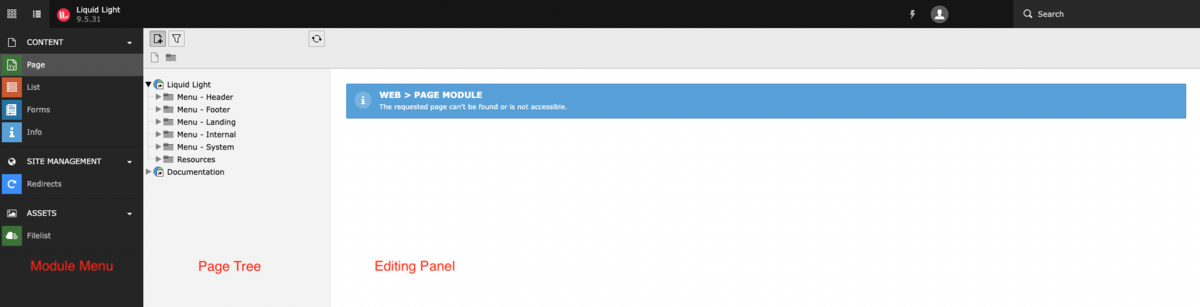
The site tree is a hierarchical menu representing the structure of your website. This column will only be visible if one of the 'Content' modules is currently selected in the modules menu.
The site tree works in the same way as your computer's hard drive, except that instead of containing folders and files the site tree contains a number of folders and pages. These folders and pages can be nested into one another in order to create a hierarchical structure.
Folders or pages containing other pages will have an arrowhead to the left-hand side of their icon. You can expand or collapse the contents of a page by clicking on the arrowhead. If you click on a page with an arrow, you will see the child pages of that page. Furthermore, the list of folders on your website corresponds to the front end. Each folder represents one of the option in your menu.
The icon to the left of each page title will allow you to identify its page type. Here is a list of the different page types you will find in the site tree:
- System folder
- Site root page
- Standard content page
- Link page
- Spacer page
If you left-click the icon located to the left of one of the page titles a context menu will appear. The context menu contains a number of options allowing you to interact with this page in different ways.
If you are having difficulties trying to find a specific page or id. The site tree has the option to search. In the top left-hand side of this second column, you will see a funnel icon. If you click on this, a search bar will appear. You can then type in any keyword or page id.