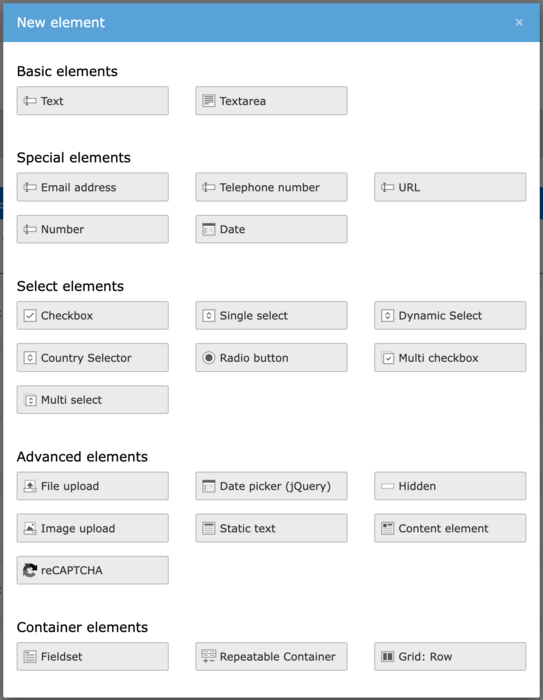
Forms
'Forms' allows you to easily build flexible forms within the typo3 interface using the 'drag and drop' system. You are able to build ambitious forms utilising the different elements and finishers. These will then be stored on your site, can be edited at anytime, and embedded anywhere.
Basic elements
- Text - This is a basic text questions and short text answer, e.g. First name
- Textarea - This is a basic text questions and long text answer, e.g. Tell us more about yourself
Special Elements
- Email address - The user can enter an email address. The answer must contain @.
- Telephone number - This allows users to enter a phone number.
- URL - Choose this when you want the user to type in a full URL. E.g. Your business website.
- Number - This requirs a numerical answer, e.g. What's your income per annum?
- Date - Input a specific date.
Select Elements
- Checkbox - This element allows you to create multiple options where the users can select one check box.
- Single select - This allows the uer to select one of the options you have created. E.g. What’s your favourite colour? Red, blue, green or yellow.
- Dynamic select
- Country select - This allows a user to select a country.
- Radio button -
- Multi checkbox - This element allows you to create multiple options where the users can select multiple check box.
- Multi select - This allows the user to check multiple options.
Advanced Elements
- File upload - This allows the user to upload a document or pdf.
- Date picker (jQuery) -
- Hidden - This allows you to select a date on a calendar.
- Image upload - User can upload an image. This wil have to be in jpg or png format.
- Static text
- Content element
Container Elements
- Fieldset
- Repeatable container - You can add this to your form, then create new elements within the container. This means that a user can repeat this container on the form by click on a + button. E.g. Award nominations.
- Grid: Row